48-Inch Double-Deck Desk With Fabric Drawers & Leveling Feet
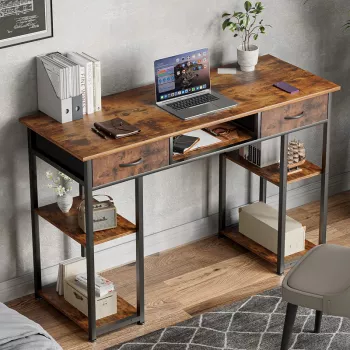
48 Inch Double Deck Office Desk with Fabric Storage Drawers and Adjustable Feet
A double-deck desk creates a cleaner, more functional workstation by separating screens, daily tools, and storage into distinct zones. This 48-inch setup pairs a raised shelf for monitors or décor with fabric drawers for quick organization, plus adjustable feet to help keep the desk stable on uneven floors—ideal for home offices, bedrooms, and compact work areas.
If you’re building a streamlined work corner, the 48 Inch Double Deck Office Desk with Fabric Storage Drawers and Adjustable Feet is designed to keep essentials close without letting clutter take over the main surface.
At a Glance: What This Desk Adds to a Workday
- Two-tier layout helps keep the main desktop open for writing, laptop use, or creative work.
- Fabric storage drawers provide closed storage for small items without bulky cabinets.
- Adjustable feet help reduce wobble and protect floors while leveling on imperfect surfaces.
- 48-inch width fits common small-to-mid workspaces without dominating the room.
Key Features and Practical Benefits
- Double deck (upper shelf + main desktop): Place a monitor on the shelf to free up the primary surface for notebooks, a keyboard, or a laptop stand. A separated screen zone can also make it easier to keep viewing height consistent, which is a common ergonomic goal.
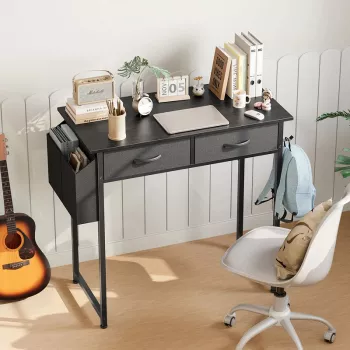
- Fabric drawers: Stash chargers, stationery, remotes, and personal items so the desk looks tidy even in shared spaces. The result is a “resettable” workspace—close the drawers, and the room instantly feels calmer.
- Adjustable feet: Fine-tune corner height to reduce rocking and improve stability on carpet, tile, or wood floors. This is especially useful in older homes where floors may subtly slope.
- Balanced footprint: Enough surface area for a focused setup (monitor + laptop or monitor + documents) while staying easy to place in a bedroom, apartment living area, or study nook.
For workstation comfort tips—monitor height, keyboard position, and seating alignment—authoritative references like the OSHA Computer Workstations eTool and Cornell University Ergonomics Web are useful guides when dialing in your setup.
Desk Setup Ideas for the Double-Deck Layout
- Monitor-first setup: Put the monitor on the top shelf, keep keyboard and mouse on the main desktop, and use drawers for cables, adapters, and small accessories.
- Hybrid laptop + monitor setup: Set the monitor on the shelf and place the laptop centered on the desktop (or on a compact riser). Reserve a drawer for adapters, an external drive, and a spare charging brick.
- Study and planning setup: Use the top shelf for reference books, a clock, or a small speaker. Keep the main surface dedicated to writing and reading, with drawers for pens, sticky notes, and calculators.
- Small-space styling: Dedicate one side of the shelf to a lamp or plant while keeping the other side reserved for screen placement. This keeps décor intentional instead of scattered across the desktop.
Storage Drawers: What to Put Where
- Daily-access drawer: Pens, highlighters, sticky notes, glasses, hand lotion, earbuds.
- Tech drawer: Chargers, USB cables, HDMI adapters, power bank, spare batteries.
- Paper control: Keep a slim file folder or mail sorter on the desktop while using drawers for stamps, envelopes, and clips to avoid paper piles.
- Visual simplicity: Drawers reduce surface clutter, which can make it easier to focus and faster to clean at the end of the day.
Stability and Leveling: Getting the Most from Adjustable Feet
Specifications and Fit Check
| Item to Check | What to Measure | Why It Matters |
|---|---|---|
| Desk width | 48 inches of wall/room space | Ensures the desk fits without blocking doors, vents, or drawers |
| Depth clearance | Desk depth + chair pull-back space | Prevents cramped seating and improves comfort |
| Monitor placement | Monitor base/stand footprint | Helps confirm the top shelf can hold the display setup cleanly |
| Storage needs | Count of small accessories | Determines whether drawers cover daily clutter or if extra organizers are needed |
| Floor unevenness | Rocking corners test | Guides adjustable-feet leveling for stability |
Assembly and Everyday Maintenance
- Assembly prep: Sort hardware, clear floor space, and tighten screws gradually (don’t fully tighten until alignment is confirmed). A small toolkit nearby helps keep the process smooth.
- Helpful tool option: If you like having a sturdy grip tool for home projects, the 18″ Aluminum Pipe Wrench is an in-stock add-on for general household tasks (though most desk assembly steps typically rely on the included hex key and a basic screwdriver).
- Keep it looking new: Wipe surfaces with a soft cloth; avoid harsh solvents that can dull finishes.
- Drawer care: Don’t overpack fabric drawers; store heavier items lower and keep sharp edges from snagging the fabric.
- Periodic check: Re-tighten fasteners after the first week of use and every few months if the desk is frequently moved or bumped during vacuuming.
For those who care about broader furniture impact and standards, the ANSI/BIFMA e3 Furniture Sustainability Standard overview offers context on how furniture sustainability can be evaluated at a higher level.
FAQ
How much can the top shelf hold for a monitor setup?
Capacity depends on the specific build and hardware, so it’s best to follow the manufacturer’s stated load limits. Keep weight centered on the shelf, avoid using it as a handle when moving the desk, and be cautious with extra-heavy monitors or leaning pressure.
Do adjustable feet help on carpet or only on hard floors?
They help on both by compensating for unevenness and reducing rocking. Thick carpet can still feel softer under load, so a chair mat can improve overall stability and make rolling easier.
Are fabric drawers sturdy enough for office supplies?
Yes—fabric drawers are well-suited for lightweight to moderate items like stationery, cables, and small gadgets. Avoid storing very heavy objects that could deform the drawer shape or stress the support rails over time.









Leave a comment