Powerful Cordless Air Duster: Clean PCs, Cars & Keyboards
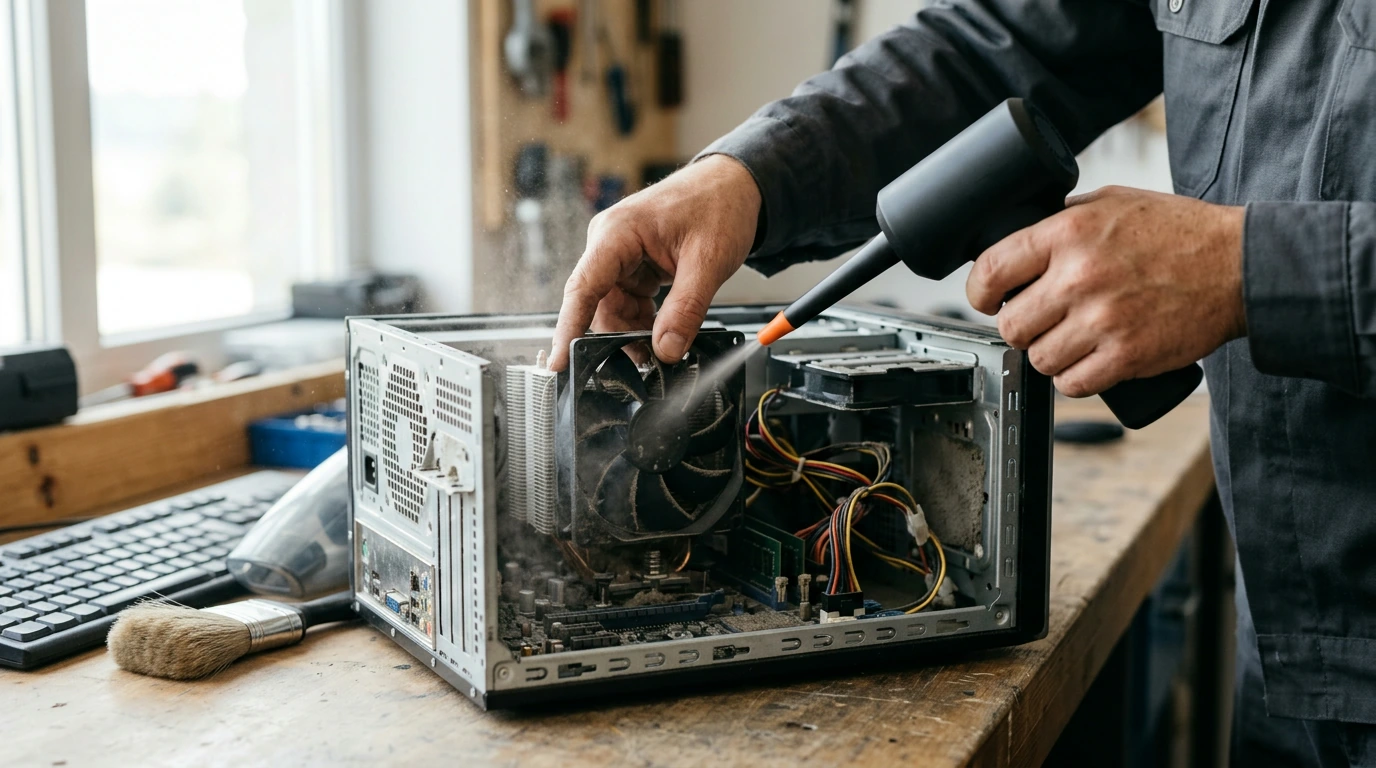
Powerful Cordless Air Duster for Fast, Cable-Free Cleaning
A cordless air duster makes it easier to clear dust and debris from electronics, tight crevices, and hard-to-reach areas without the waste and chill of disposable canned air. It’s a practical tool for quick cleanups at a desk, in a PC tower, around car vents, or anywhere an outlet is inconvenient. Below, you’ll find where a cordless air duster shines, what features matter in daily use, and how to operate it safely around sensitive gear.
What a Cordless Air Duster Does Best
- Blows loose dust out of keyboards, PC cases, vents, and small openings without physical contact.
- Speeds up routine cleaning for home offices, workshops, and cars when outlets are inconvenient.
- Reduces recurring purchases of disposable air cans and avoids propellant residue concerns.
- Works well for quick “spot cleaning” before deeper wipe-downs.
For many households, switching from disposable cans to a rechargeable duster is also a straightforward way to cut down on single-use waste (see EPA: Reduce, Reuse, Recycle).
Common Places to Use It (and When to Avoid It)
- Computers: case filters, GPU/CPU cooler fins (use short bursts; prevent fan overspin).
- Keyboards and desk setups: between keycaps, under stands, inside docking stations.
- Cars: dashboard vents, seat rails, center console seams, trunk corners.
- Home: window tracks, sliding door rails, radiator fins, appliance crevices.
- Avoid: blowing dust deeper into sealed devices, blasting directly into ports when debris could wedge, or using on wet surfaces.
If you’re cleaning work areas with a lot of fine dust, be mindful that it becomes airborne and can resettle. A quick vacuum pass after blowing debris out of corners often finishes the job more cleanly than air alone.
Power, Control, and Battery: What Matters Day to Day
- Airflow strength: stronger output clears embedded lint faster, but needs careful handling near delicate parts.
- Speed control: multiple levels help switch from gentle electronics cleaning to tougher crevice work.
- Battery runtime: longer runtime reduces mid-job charging; consider recharge time for frequent use.
- Ergonomics: grip comfort and trigger feel matter during extended cleaning sessions.
- Noise: higher power typically increases noise; plan usage around shared spaces.
One practical “everyday” test: if you can comfortably hold the tool steady while aiming into narrow seams for 30–60 seconds at a time, you’re more likely to use it regularly (which is what keeps vents and filters from building up into bigger problems).
Attachments and Cleaning Scenarios
- Narrow nozzle: concentrated stream for vents, corners, and tight seams.
- Brush attachment: loosens dust while air carries it away (use gentle pressure).
- Wide outlet option (if included): faster coverage on larger surfaces like filters and mats.
- Inflation-style tips (if included): can help with small inflatables, but confirm compatibility and heat buildup.
Quick Match: Task vs. Recommended Setup
| Task | Recommended tip | Power level | Notes |
|---|---|---|---|
| Mechanical keyboard cleanout | Narrow nozzle | Low–Medium | Angle the airflow to push debris out, not down into the board |
| PC case dust filters | Wide outlet / no tip | Medium | Remove filters first; blow from the clean side outward when possible |
| Car AC vents | Narrow nozzle | Medium | Follow with a microfiber wipe to catch loosened dust |
| Camera bag crumbs | Brush + gentle airflow | Low | Keep airflow away from lens elements; do not replace a lens blower for sensors |
| Window/door tracks | Narrow nozzle | High | Vacuum afterward to remove piles pushed into corners |
Safe Use Around Electronics and Sensitive Parts
- Use short bursts and keep a small distance to avoid forcing debris into connectors.
- Hold spinning fans still (or block airflow) to prevent overspin that can stress bearings.
- Clean in a well-ventilated area; dust becomes airborne and can resettle.
- Avoid directing airflow at loose jumpers, tiny screws, or fragile ribbon cables.
- If static is a concern, pair airflow cleaning with good handling practices: power down devices, unplug, and ground before touching internals.
Also note that workplace safety rules around compressed air focus on responsible use and pressure limits (see OSHA: Compressed Air for Cleaning). While a cordless air duster is not the same as an industrial compressor line, the same common-sense approach applies: don’t aim at skin, eyes, or loose debris that can become a projectile.
Maintenance and Storage Tips
For rechargeable devices, basic lithium-ion safety habits matter—avoid extreme heat, use the intended charging method, and inspect for damage (reference: NFPA: Lithium-Ion Battery Safety Resources).
Product Snapshot: Powerful Cordless Air Duster
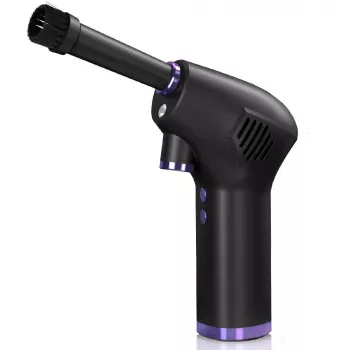
If you want a straightforward, cable-free way to clean vents, keyboards, PC filters, and car crevices, the Powerful Cordless Air Duster is built for quick dust removal without disposable air cans. It’s especially handy for regular “maintenance cleaning” where a fast blowout prevents buildup that later requires a full teardown.
More Handy Picks for Home and Garage
- 18″ Aluminum Pipe Wrench for tougher plumbing and mechanical tasks where grip and leverage matter.
- 5-Level Cat Tree with Large Hammock, Scratching Posts, and Cozy Condo for Indoor Cats to help keep cats engaged (and often away from keyboards and desk cables).
FAQ
Is a cordless air duster safe for cleaning inside a PC?
Yes when used carefully: power down and unplug, use short bursts, keep some distance, and prevent fans from spinning freely. Avoid forcing debris deeper into ports or delicate connectors.
Can a cordless air duster replace canned air?
For regular dusting and crevice cleaning, it can handle most of the same jobs with less ongoing waste. Canned air may still be useful for very small, tightly controlled puffs, but many households switch fully to rechargeable dusters.
How often should electronics be dusted?
Most home setups benefit from monthly to quarterly cleaning depending on pets, carpets, and airflow. If you can see dust collecting on vents or PC filters, clean sooner to help maintain cooling performance.








Leave a comment