Electric Standing Desk Setup: Ergonomics & Key Features
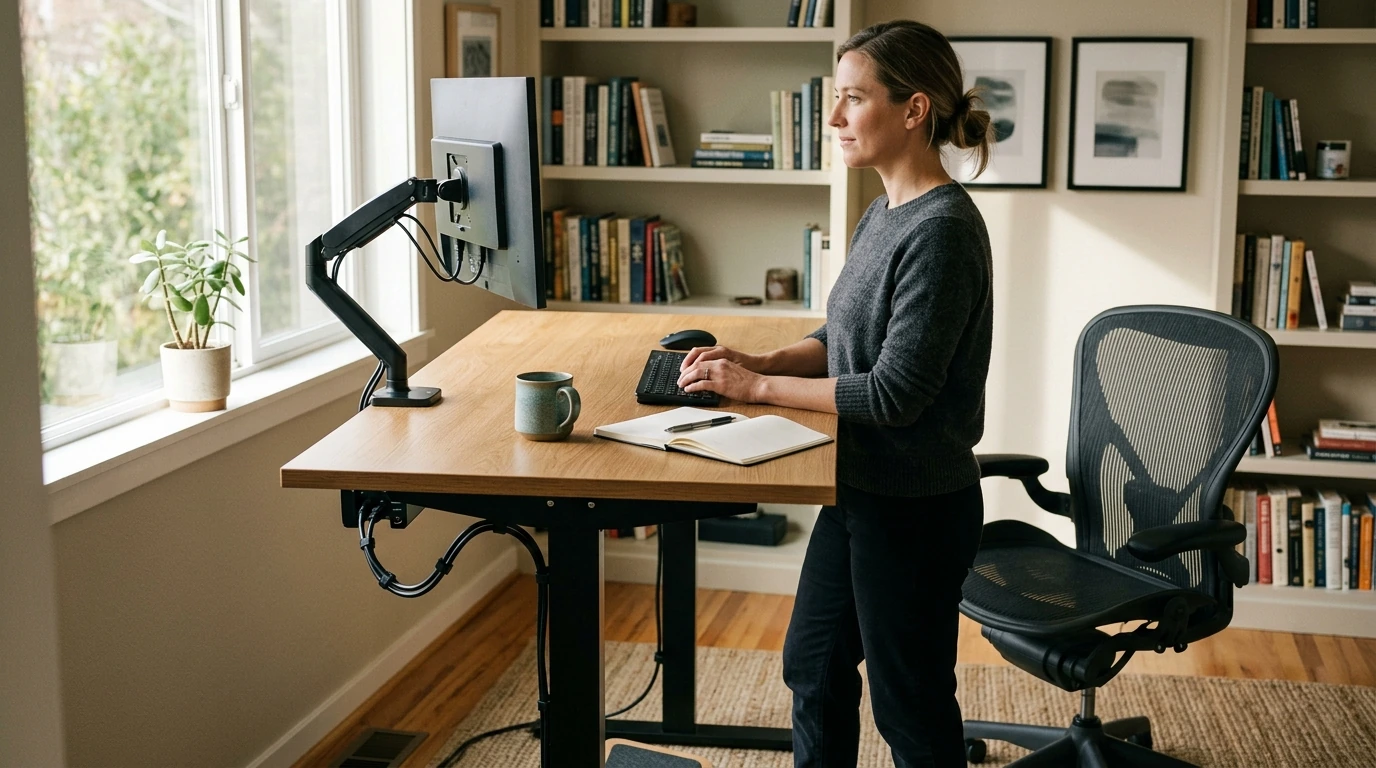
Electric Height-Adjustable Standing Desk for a Comfortable Home Office Setup
A height-adjustable desk makes it easier to alternate between sitting and standing throughout the day, supporting better posture habits and helping reduce the “stuck in one position” feeling. The difference isn’t just comfort—when your setup is easier to adjust, you’re more likely to actually use it as intended. The goal is a desk that moves smoothly, stays stable at standing height, and fits your real workflow (monitors, notebooks, coffee mug included), not just a photo-ready setup.
What changes when a desk can move
A desk that adjusts on demand turns posture changes into a normal part of the workday instead of a disruption. When switching positions is quick, it’s easier to build better habits—especially during long focus blocks.
- Encourages posture variation by making it simple to switch positions during focused work blocks.
- Helps tailor the work surface to different tasks (typing, writing, video calls) and different users in the same household.
- Pairs well with ergonomic basics: monitor at eye level, elbows near 90°, wrists neutral, feet supported.
- Works best when standing time is introduced gradually and alternated with sitting rather than replacing sitting entirely.
For practical workstation guidance, the OSHA Computer Workstations eTool and the Mayo Clinic’s office ergonomics guide are helpful references for aligning your screen, keyboard, and chair in a way that supports comfort over time.
Key features that matter day to day
The best standing desk features are the ones you notice during a normal Tuesday: how steady it feels while typing, whether the controls are intuitive, and how easy it is to keep cables from tugging when the desk rises.
- Electric lift system: Prioritizes smooth movement and consistent positioning without manual cranking.
- Control panel: Look for intuitive up/down controls; memory presets are useful if multiple people use the desk or if preferred heights are consistent.
- Noise and speed: A quieter motor is more comfortable for shared spaces; a reasonable lift speed reduces “waiting to work.”
- Stability: A solid frame and secure fasteners reduce wobble, especially when typing or using a monitor arm.
- Surface size and shape: Confirm the desktop fits the monitor(s), keyboard/mouse, and any daily essentials without crowding.
- Cable strategy: Plan for slack during movement and use clips/under-desk routing to prevent snags.
Quick checklist before buying
| What to check | Why it matters | Practical tip |
|---|---|---|
| Minimum and maximum height | Ensures comfortable sitting and standing positions | Match sitting height to chair/footrest and standing height to elbow level |
| Stability at standing height | Reduces shaking while typing | If possible, test with monitors and arms installed or check return policy |
| Controller usability | Affects how often height changes actually happen | Prefer simple controls; presets help repeatable setups |
| Desktop size | Determines workable layout | Sketch placement of monitor(s), laptop, and notebook before ordering |
| Cable slack and routing | Prevents tugging and damage | Leave a gentle loop and anchor cables under the top |
Setting the right sitting and standing heights
Most comfort issues come down to two things: the working surface being too high (shoulders creeping up) or too low (slouching and wrist angles getting awkward). Dialing in your two “home base” heights—one for sitting and one for standing—makes switching positions feel natural.
- Keyboard height: Keep elbows close to the body and forearms roughly parallel to the floor; avoid shrugging shoulders.
- Monitor height: Keep the top of the screen roughly at eye level; place the screen about an arm’s length away (adjust to comfort and vision needs).
- Standing posture: Distribute weight evenly, keep knees soft (not locked), and avoid leaning on the desk edge.
- Foot support: A footrest or small platform can help some users reduce fatigue during standing intervals.
- Time strategy: Alternate positions (for example, 20–40 minutes sitting, 10–20 minutes standing) and adjust based on comfort.
Alternating matters because staying in any single position too long can feel draining. If you want a broader health perspective on long sitting time, Harvard Health Publishing summarizes key concerns in The dangers of sitting.
Assembly, placement, and daily use tips
A standing desk can feel dramatically better (and last longer) with a little attention to setup details—especially stability and cable movement.
If you’re putting together a workspace from scratch, keeping a basic tool on hand can make assembly less frustrating. For occasional home projects and tightening tasks, the 18″ Aluminum Pipe Wrench is an in-stock option to consider.
Electric Height-Adjustable Standing Desk: product snapshot
Current listing details
| Item | Value |
|---|---|
| Name | Electric Height-Adjustable Standing Desk |
| Price | 105.17 USD |
| Stock status | In stock |
| Product page | Electric Height-Adjustable Standing Desk |
Who this style of desk is a good match for
FAQ
How often should the desk be raised to standing height during a workday?
Alternating tends to work better than standing all day. Start with short standing intervals (like 10–20 minutes) and increase gradually as your comfort and stamina improve.
Do standing desks reduce back pain?
Results vary from person to person, and setup matters a lot. Many people feel better when they alternate positions and keep monitor/keyboard height aligned, rather than relying on standing alone.
How can cables be managed on a desk that moves up and down?
Leave a small slack loop for every cable, anchor a power strip under the desktop, and use clips or sleeves to guide cords. After routing, raise the desk to full height to confirm nothing pulls tight.










Leave a comment